30 Days of SEO Tips Series – Day 27: Focus on User Experience (UX)

User Experience (UX) has become one of the most critical ranking factors for SEO. Google’s algorithms increasingly prioritize websites that provide a seamless, efficient, and engaging experience for users. A website with great UX not only attracts users but also keeps them engaged, reduces bounce rates, and increase conversions.

In this article, you’ll learn why UX is important for SEO, how you can improve UX, and the free tools available to help you get started.

30 Days of SEO Tips Series – Day 27: Focus on User Experience (UX)

Why UX Matters for SEO?

User experience directly influences several key factors that search engines consider when ranking websites. Let’s look at the reasons why focusing on UX is essential for SEO success:

  1. Page Load Speed: Websites that load slowly frustrate users, leading them to leave the site. Google prefers faster websites as they provide a better user experience. Optimizing for speed is key to lowering bounce rates and improving rankings.

  2. Mobile-Friendliness: As mobile usage continues to grow, websites must be fully responsive. Google rewards sites that offer seamless mobile experiences, ensuring that users can easily navigate regardless of the device they’re on.

  3. Core Web Vitals: These metrics assess how well a webpage loads, interacts, and remains stable. Core Web Vitals, including Largest Contentful Paint (LCP), First Input Delay (FID), and Cumulative Layout Shift (CLS), are critical factors in ranking.

  4. Clear Navigation: Users should be able to find what they’re looking for quickly and easily. A website with simple, intuitive navigation improves the user journey, enhances engagement, and boosts SEO performance.

  5. Design and Readability: Clean, visually appealing designs and easy-to-read content keep users engaged and more likely to stay on your site. Google values websites that prioritize readability and a user-centered design.

The Impact of Optimized UX on SEO

Focusing on user experience has a direct impact on your website’s SEO performance:

  • Lower Bounce Rates: By improving UX, you can reduce the number of visitors leaving your website immediately after arriving, which is a positive signal for search engines.

  • Higher Engagement: When users find your website easy to navigate and visually appealing, they are more likely to stay longer, browse more pages, and take action.

  • Increased Dwell Time: Google rewards websites where users spend more time. High dwell times are an indicator of valuable content and good user experience.

  • Better Search Rankings: By addressing key UX factors such as speed, mobile-friendliness, and core web vitals, you can significantly improve your search engine rankings.

Here’s a graph illustrating The Impact of Optimized UX on SEO. It highlights how different aspects of user experience contribute to various SEO outcomes.
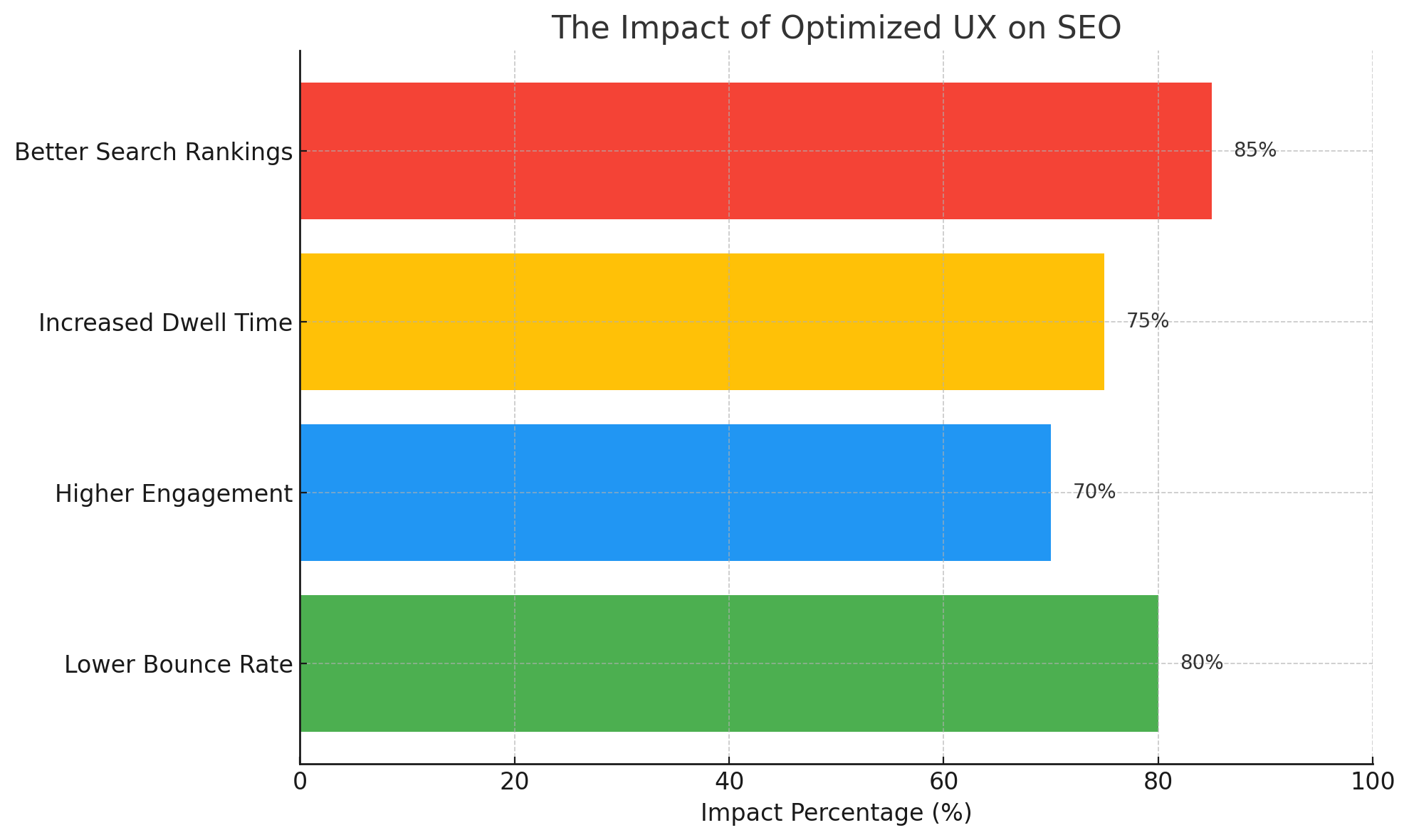

The Impact of Optimized UX on SEO

Free Tools to Improve UX

Here are some free tools you can use to enhance your website’s user experience:

  1. Lighthouse: Lighthouse is an open-source tool from Google that analyzes various aspects of your site’s performance, including SEO and UX. It provides actionable insights to improve page load speed, mobile responsiveness, and accessibility.

  2. Hotjar: This tool helps you understand how users interact with your site by providing heatmaps and session recordings. You can visualize user behavior to identify areas for UX improvement.

  3. Google Analytics: By monitoring key metrics such as bounce rate, time on page, and pages per session, Google Analytics helps you track UX improvements and make data-driven decisions.

  4. GTmetrix: GTmetrix provides detailed insights into your website’s loading speed and gives recommendations on how to optimize performance for a better user experience.

How to Implement UX Improvements on Your Website

To optimize UX, here are some practical steps you can take:

1. Optimize Page Load Speed

Speed is crucial for both UX and SEO. Websites that load faster rank higher and keep users engaged.

  • For WordPress: Use caching plugins like WP Rocket or W3 Total Cache to speed up your website. Image compression plugins like Smush can also reduce load times.
  • For Custom Websites: Enable gzip compression, use a Content Delivery Network (CDN), and minimize HTML, CSS, and JavaScript.

2. Improve Mobile Experience

With the majority of web traffic coming from mobile devices, a mobile-responsive website is essential for good UX and SEO.

  • For WordPress: Use responsive themes and plugins like WPtouch to ensure a seamless mobile experience.
  • For Custom Websites: Use a framework like Bootstrap to create a mobile-friendly design, or implement media queries in your CSS to optimize for different screen sizes.

3. Simplify Navigation

An easy-to-navigate website is crucial for keeping users engaged and boosting your SEO rankings.

  • For WordPress: Create clear, intuitive menus and add breadcrumbs using plugins like Yoast SEO.
  • For Custom Websites: Use CSS and JavaScript to build simple, effective navigation menus, and include breadcrumbs for better site structure.

4. Optimize Core Web Vitals

Core Web Vitals focus on page load performance, interactivity, and stability. They are critical to providing a smooth experience.

  • How to Implement: Use tools like Lighthouse or PageSpeed Insights to measure and optimize your Core Web Vitals. Focus on reducing server response times, optimizing images, and minimizing layout shifts.

5. Clear and Engaging CTAs

CTAs should guide users towards the desired action, such as signing up or purchasing a product.

  • For WordPress: Use plugins like Thrive Leads to create attention-grabbing CTAs.
  • For Custom Websites: Use bold designs and clear, actionable text to make your CTAs stand out.

Key Takeaways

  • Page Load Speed: Faster websites provide better user experiences and higher SEO rankings.
  • Mobile-Friendliness: Ensure your site is responsive for users across all devices.
  • Core Web Vitals: Focus on key performance metrics like load speed and visual stability to enhance UX.
  • Simple Navigation: An intuitive layout helps users find information quickly, improving engagement.


Ready to enhance your website’s user experience and boost your SEO rankings? Contact us today for expert guidance on improving UX and optimizing your website for search engines!

Table of Contents

Get 30 Minute Free Consultation

Schedule your free session now and let’s create solutions that drive results.

Free Consultation Blog Page

Stay Ahead with Expert Insights

Subscribe to our newsletter for the latest trends, tips, and exclusive updates. Get actionable strategies delivered straight to your inbox.

Newsletter Form

From the same category